Review: Acer Swift Air 14 is a MacBook challenger that holds its own
 Dominic Bayley
27 Oct 2026
Dominic Bayley
27 Oct 2026
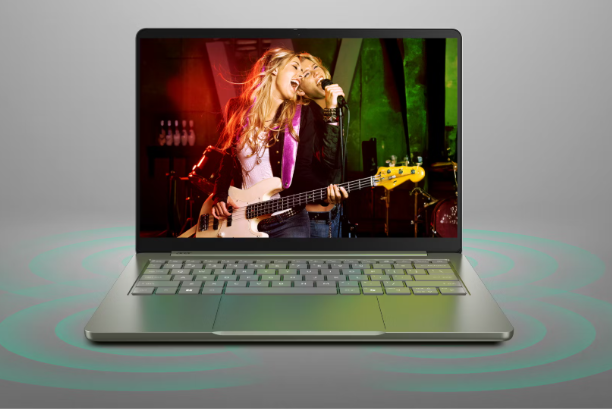
The Acer Swift Air 14 punches well above its weight, combining a premium aluminium design, impressive battery life and capable everyday performance in a lightweight laptop that won’t break the bank.
While its modest 8GB of RAM limits its appeal for demanding workloads, the Swift Air 14 has plenty going for it, particularly for students, office workers and anyone looking for an affordable laptop that doesn’t compromise on build quality.
My review unit came equipped with an Intel Core 5 320 processor, 8GB of RAM and 512GB of SSD storage, with a retail price of $1,599. Acer also offers a more affordable Intel Core 3 configuration for $1,399, while higher-end models are available with up to an Intel Core 7 350 processor.
The Acer Swift Air’s design feels very robust. It features an aluminium construction and feels very tough around the base – I couldn’t register any flexing either on the keyboard or on the display.
The laptop sports an ultra-thin design measuring just 12.95 mm at its thinnest. That puts the Swift Air on par with the Apple MacBook Neo and Dell XPS 13 both of which are just 12.7 mm thick.
At 1.19 kg it’s much lighter than a typical 14-inch laptop which usually weighs around 1.36 kg. That makes it ideal for dropping into a satchel or bag and commuting to work or school.
Acer has provided a well-balanced keyboard with right and left Shift keys, but the laptop doesn’t have a numpad. Although only a 14-inch laptop keyboard, Acer has managed to fit in right and left alt keys, the placement of which I really liked.
The keys are wide and spacious, and the key travel is very decent. The backlighting is very faint however, meaning their visibility is greatly reduced at night. The top row of the keyboard features dedicated keys for AcerSense, Acer’s utility software, as well as a shortcut to Acer.com which some users may find convenient.
The included trackpad feels very tactile and works well for a budget laptop, although it’s only clickable in the bottom two thirds of the trackpad surface.
The Acer Swift Air’s connectivity is very useful for a laptop of its size. On the left-hand side, it sports two Thunderbolt 4 USB-C ports which are a fresh feature in a laptop in this class. On the right, there’s a 10GBps USB-A port and a 3.5mm audio jack. That connectivity beats out the MacBook Neo’s slower USB-C ports.
The Thunderbolt 4 ports are especially useful for your productivity and presentation needs. Each port bestows a quick file transfer speed of up to 40GB/s and additionally allows you to stream content to two 4K displays or a single 8K display at 60 frames per second.
Interestingly the Acer Swift Air 14 features a 1200p display rather than a 1080p one. The display reclined fully when I tested it but surprisingly it isn’t touch-enabled. My measurements registered a maximum brightness of 370 nits which is adequate for everyday office use.
From a colour perspective, the IPS display looks rich and vivid. Detail was also very crisp on the 14-inch screen.
The bezel beneath the display is very well proportioned which allows The Acer Swift Air 14’s display to reach a full 16:10 aspect ratio. That means there is plenty of real estate for viewing documents like spreadsheets side to side.
The laptop’s audio quality is quite decent. Acer features four speakers powered by DTS:X Ultra Audio. The package delivers solid audio from highs to lows. The bass range is a little soft, but that’s not unusual for a laptop of this size.
Powering my review unit is Intel’s Core 5 320 processor, part of Intel’s Wildcat Lake family designed for lightweight productivity laptops.
The processor features six cores and six threads, with a base clock speed of 1.5GHz and a maximum turbo frequency of 4.6GHz.
In everyday use, the processor proved more than capable of handling routine computing tasks.
Microsoft Office applications ran smoothly, web browsing was responsive, and video playback presented no problems.
For users whose workloads revolve around documents, spreadsheets, presentations, emails and general internet use, there’s more than enough processing power available.
The limitations become apparent when moving beyond those tasks.
Video editing and encoding proved considerably more challenging, with the laptop struggling to maintain the same level of responsiveness.

The biggest restriction is arguably the 8GB of RAM.
While that amount remains sufficient for basic productivity, it’s increasingly restrictive for a modern Windows laptop, particularly when running demanding applications or multitasking extensively.
With 16GB becoming a more desirable starting point for users who want their laptop to remain capable over several years, Acer’s decision to include just 8GB is disappointing.
Granted that the laptop has an integrated graphics chip rather than a more powerful discrete graphics chip the Acer Swift Air is also not suitable for intensive graphics tasks like gaming. Again, you shouldn’t have any trouble with light graphics tasks like rendering simple 2D images or watching videos, but for more complex tasks like 3D rendering, the Acer Swift 14 Air isn’t ideal.
Acer claims the Acer Swift Air’s large 70Wh battery lasts up to 19 hours of continuous video playback. In my testing I found the laptop lasted 19.5 hours before it ran out of juice. That’s a fantastic result that bides well for powering the laptop for more than a day’s work.
In summary, The Acer Swift Air 14 is a surprisingly accomplished laptop that delivers several features normally associated with more expensive machines.
Its sturdy aluminium construction, lightweight design, excellent connectivity and vivid 16:10 display make it a compelling choice for everyday productivity.
The inclusion of two Thunderbolt 4 ports is particularly impressive, while the outstanding 19.5-hour battery life gives it a significant advantage for users who value portability and endurance.
Performance from the Intel Core 5 320 processor is also perfectly adequate for office applications, web browsing, streaming and other routine computing tasks.
However, the decision to equip the laptop with just 8GB of RAM is difficult to overlook, especially at my review unit’s $1,599 asking price.
Pros
- Exceptionally thin and lightweight design
- Bright and vibrant 1200p display
- Snappy and responsive processor
- Long battery life
Cons
- 8GB of RAM limits the laptop to lightweight tasks
- An Integrated GPU makes it unsuitable for gaming
- No touchscreen option